Looking for the best budget graphics cards for 1080p gaming in 2026? Good — 1080p is still the resolution where a modest GPU budget stretches the furthest, even with prices up across the board this year.
The bad news: budget GPU pricing has moved up more than usual lately, squeezed by memory shortages and AI-driven demand eating into supply. The good news: you still don’t need to spend a fortune to hit smooth 1080p frame rates. You just need to know where the real value sits, not just which card has the flashiest name. TrendForce’s August 2026 report on RTX 50 pricing in Korea is one example of how fast street prices can shift.
The Quick Answer: What to Look For at Each Price Band
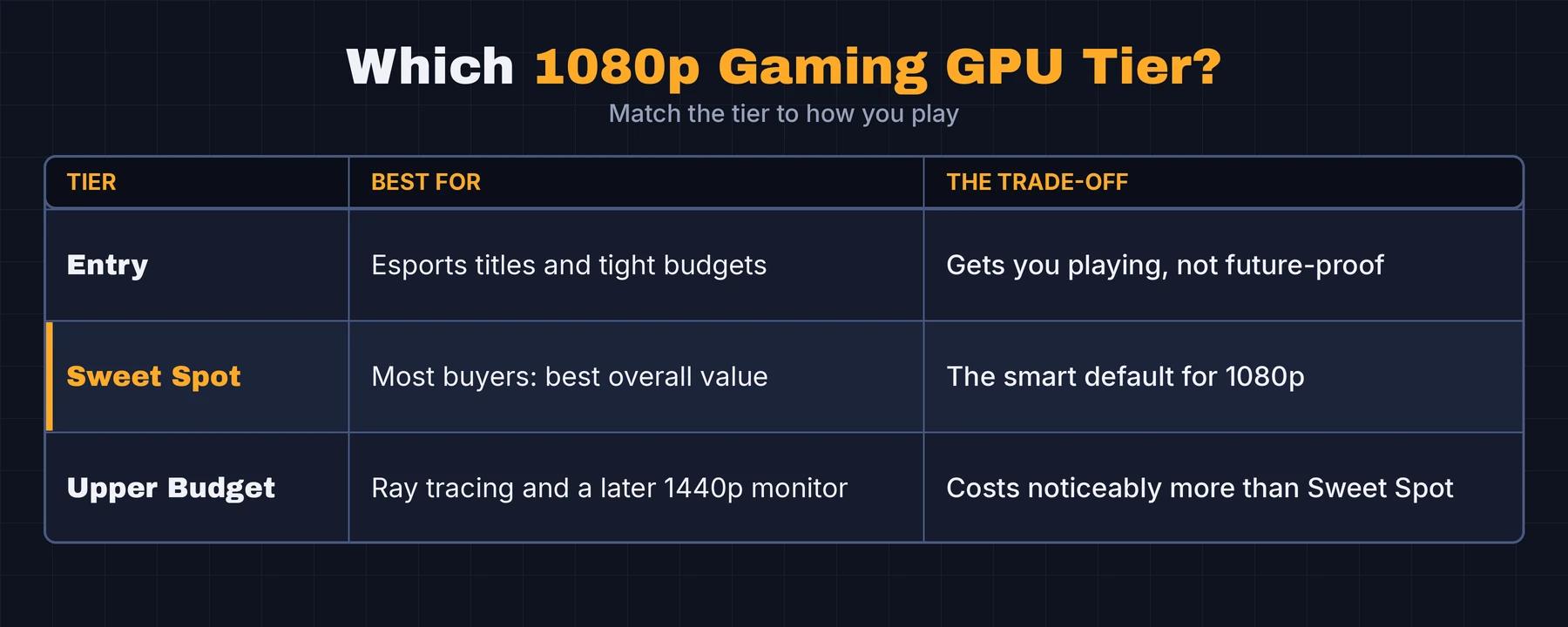
Budget GPU shopping in 2026 breaks down into three practical tiers. Here’s the fast version: if you only remember one thing from this guide, the Sweet Spot tier is where most buyers should land. It’s rarely the cheapest option and never the flashiest, but it’s the one that ages best.
How We Picked
We’re evaluating cards on three things that actually matter for a 1080p build: price-to-performance at current street pricing (not MSRP, which has become close to meaningless this year), VRAM headroom for the games you’ll realistically play over the next two to three years, and driver stability — a card that’s cheap but crashes in half your library isn’t a deal, it’s a headache.
We’re deliberately not naming specific SKUs with exact prices in this piece. GPU pricing has been moving fast enough in 2026 that a number printed today can be stale by next month. So instead, we’re giving you a framework — the tier, the brand tradeoffs, the specs that actually matter — so you can check current street prices yourself and slot the right card into the right tier.
Prices have moved a lot this year, and we explain why GPU prices are rising in 2026. Check current street prices before you buy.
Entry Tier: The Cheapest Cards Worth Buying for 1080p Gaming
Who This Tier Is For
If you mostly play esports titles — shooters, MOBAs, older competitive games — or you’re building on a genuinely tight budget, entry tier cards still get the job done. This is the “just get me playing” option, not the “future-proof my build” option, and there’s nothing wrong with that if it matches your budget. For 1080p gaming in esports titles, this tier is usually all you need.
What to Expect at This Price
At this price point, you’re getting enough VRAM to run most games at 1080p medium-to-high settings, but not much headroom beyond that. Ray tracing is generally off the table — the silicon just isn’t built for it, and trying to force it usually tanks your frame rate. Don’t expect this tier to age gracefully past a couple of years if you gravitate toward newer, more demanding titles.
Sweet Spot Tier: The Best Overall Value for 1080p Gaming
Why This Tier Is the Smart Default
This is where the actual value lives in 2026. Cards in this band handle current AAA titles at 1080p high settings without much compromise, carry enough VRAM to avoid becoming a bottleneck in a year or two, and — honest opinion here — are usually a smarter buy than stretching into the tier above “just in case.” Most buyers overspend chasing specs they’ll never actually use at 1080p.
Upper Budget Tier: 1080p Gaming With Ray Tracing Headroom
If you want ray tracing effects, or you’re eyeing a 1440p monitor down the road without swapping your GPU again, this is the tier to shop. You’ll pay noticeably more than Sweet Spot for it. And worth saying plainly: the jump isn’t always worth it if you’re staying at 1080p long-term. This tier makes the most sense for buyers planning to keep the card through a future monitor upgrade — not for someone who just wants smooth 1080p today. If your main goal is 1080p gaming today, the Sweet Spot tier usually makes more sense.
NVIDIA vs. AMD vs. Intel: Which Fits Your Build
All three major GPU makers field budget-tier cards in 2026, and the honest answer is that the “best” brand depends on what you actually value:
- NVIDIA’s budget cards generally lead on upscaling technology (DLSS) and ray tracing support even at entry-level price points, but often carry a small price premium just for the name on the box.
- AMD’s budget lineup tends to offer more VRAM per dollar and competitive raw rasterization performance, with FSR as the upscaling equivalent. FSR has generally been rated behind DLSS for image quality in reviews, though the gap has narrowed.
- Intel’s Arc budget cards have become a legitimate third option, often the most aggressive on price-to-performance. Driver maturity used to be the real tradeoff here, though that’s improved a lot since Arc’s rocky early days — still worth checking recent reviews before buying rather than assuming it’s fixed.
What Actually Matters for 1080p Gaming (and What Doesn’t)
VRAM: How Much You Really Need
For 1080p gaming in 2026, more VRAM than you’d think is worth having. Modern game textures have gotten heavier even at 1080p, and running out of VRAM causes stutters that no amount of raw GPU horsepower fixes. Don’t buy the cheapest card in a tier just to save a few dollars if it means dropping to a meaningfully smaller VRAM pool — that’s the kind of false economy that shows up two years later.
Upscaling (DLSS/FSR): Free Performance or a Crutch?
Upscaling tech lets a budget GPU render at a lower internal resolution and reconstruct a sharper image, effectively buying you frame rate for close to free. It’s genuinely useful. But don’t buy a card based on upscaling alone — native performance still matters, especially in competitive games where the added latency from upscaling can be a real downside rather than a bonus. NVIDIA’s DLSS overview explains how its upscaler works, and it’s worth checking which upscaling technologies a card supports before you buy.
Common Budget GPU Buying Mistakes
- Chasing MSRP that no longer exists. Manufacturer suggested pricing has become mostly aspirational in 2026 — shop actual street prices, not the number on a spec sheet.
- Ignoring VRAM to save a small amount up front. This is the mistake that costs you the most down the line.
- Overspending on ray tracing you won’t use. If you’re staying at 1080p and don’t care about ray tracing effects, the Upper Budget tier is often money spent on features you’ll rarely notice.
- Skipping the power supply check. A budget GPU upgrade means nothing if your existing power supply can’t handle it — check wattage and connector requirements before buying, not after.
- Related reading: Why GPU Prices Are Painful: 4 Real Causes, Explained
Frequently Asked Questions
What is the best budget graphics card for 1080p gaming in 2026?
There isn’t one single “best” card — it depends on your budget tier. For most buyers, a Sweet Spot tier card offers the strongest overall value for 1080p gaming right now.
Is 8GB of VRAM enough for 1080p gaming in 2026?
It’s workable for many titles but increasingly tight for newer, texture-heavy games. If your budget allows it, more VRAM is a safer long-term bet.
Should I buy AMD or NVIDIA for a budget build?
Both make solid budget options. NVIDIA generally leads on upscaling and ray tracing features; AMD tends to offer more VRAM per dollar. Intel’s Arc lineup is a legitimate value option too, if driver maturity for your specific games checks out.
How much should I spend on a GPU for 1080p gaming?
Enough to land in the Sweet Spot tier if you can. Going cheaper risks VRAM bottlenecks sooner; going pricier for ray tracing only pays off if you actually use those features.
Are last-gen GPUs still worth buying in 2026?
Sometimes, but check prices first. Older cards are also above MSRP in 2026 in some markets.
Do budget GPUs support ray tracing?
Entry tier cards generally don’t have meaningful ray tracing headroom. Upper Budget tier cards do, though performance with ray tracing enabled is still a real compromise at this price range.
What GPU do I need for 1080p 144Hz gaming?
You’ll want at least a Sweet Spot tier card — Entry tier cards can struggle to sustain 144fps in newer titles even at 1080p.
The Bottom Line
Budget GPU shopping in 2026 isn’t about finding the single cheapest card — it’s about matching the right tier to how you actually play. If you’re on esports titles and older games, Entry tier will serve you fine. If you want the best all-around value at 1080p, the Sweet Spot tier is the smart default for most buyers. And if ray tracing or a future 1440p monitor is in your plans, Upper Budget is where that headroom lives.
Check current street prices against this framework rather than chasing a specific model name — pricing is moving fast enough this year that the tier matters more than the label on the box.